 Domain SearchSecure your perfect Australian domain in seconds
 Web HostingExplore budget-friendly web hosting packages
 cPanel HostingHosting powered by cPanel (The world’s most intuitive control panel)
 Reseller HostingStart your hosting reseller business, without the technical challenges
 Windows HostingOptimised for Windows applications and websites
 Affiliate ProgramGet paid for referring customers to our services
 WordPress HostingHigh-Speed, Optimised WordPress Hosting
 Email HostingSecure business email hosting using your own domain, professional, reliable, and easy to control.
 Domain TransferTransfer your domain with no downtime and complete control
 All DomainsFind and secure domain extensions from around the globe
 Whois LookupCheck domain ownership, expiry dates and registrar details
 .Com DomainSecure the world’s most trusted domain for instant credibility
 AU DomainsGet recognised .au domains made for Australian businesses and people
 SSL CertificateProtect your site with reliable SSL Certificates to safeguard data and build visitor confidence.
 Vps HostingScalable VPS. Complete access. Top-tier speed.
 Managed VPSNot a tech person? Go with our fully managed VPS service.
 Dedicated ServersGet all the power and all the control of your own physical server.
 AI Website BuilderMake professional websites in minutes with AI, no experience needed.
 Online Shop BuilderStart a professional online store. No coding needed.
 Web Design ServiceGet a website designed around your brand and built for your goals.
 BlogBrowse articles on web hosting, online business, digital marketing and other topics
 SupportGet help and instructions for all our services
 ContactConnect with us anytime using chat or email
So you’ve decided to take your business online? Good for you, mate!
Whether you’re starting a small business in Sydney, launching a blog about surfing in Byron Bay, or setting up an online store for your handmade goods, the first thing you’ll need is a domain name.
Think of it as your digital street address,without it, nobody can find you online.
I know what you’re thinking: “This sounds complicated.” But trust me, domain name registration is easier than you think. We’ll walk through everything together, step by step, like a good mate helping you move house.
Let’s get into it.
What Exactly Is Domain Name Registration?
Before we dive into the how, let’s quickly cover the what.
Domain name registration is the process of claiming your unique website address on the internet. It’s what people type into their browser to find you—like www.yourbusiness.com.au.
Without a domain name, you’re basically invisible online. It’s that simple.
And here’s the thing: your domain name isn’t just a technical requirement. It’s part of your brand, your identity, and how Aussies will remember you.
Why Australian Businesses Need a .com.au Domain
You might be wondering: “Can’t I just get a .com domain?”
Sure, you could. But here’s why a .com.au domain is better for Australian businesses:
Local Trust: When Aussies see that .com.au extension, they know you’re local. It builds instant credibility.
Better Search Rankings: Google prioritizes location-specific results for users searching within Australia, and a .au domain signals geographic relevance.
Shows You’re Legit: To get a .com.au domain, you need an ABN or ACN. This proves you’re a registered Australian business.
Bottom line? If you’re targeting Australian customers, a .com.au domain is your best bet for domain name registration.
Step 1: Check If You’re Eligible for Domain Name Registration

Here’s something important you need to know first: not everyone can register a .com.au domain.
To register a .com.au or .net.au domain, you need to have either an Australian Company Number (ACN) or Australian Business Number (ABN).
What You’ll Need:
- Australian Business Number (ABN) – This is an 11-digit number
- Australian Company Number (ACN) – This is a 9-digit number
- Registered Australian Trademark – If you have one
Don’t have an ABN yet? No worries! Getting one is free and takes about 15 minutes online through the Australian Taxation Office website.
What If I Don’t Have an ABN?
If you’re just starting a personal blog or website that’s not for business, you’ve got other options:
| Domain Type | Who Can Register | Requirements |
|---|---|---|
| .com.au | Australian businesses | ABN or ACN |
| .net.au | Australian businesses | ABN or ACN |
| .id.au | Australian individuals | Australian citizenship or residency |
| .org.au | Non-profits | ACNC registration with ABN |
| .com | Anyone | None |
The .id.au is perfect for personal sites, but remember—.id.au domains cannot be registered for commercial use, as they are a domain intended for personal use.
Step 2: Choose Your Perfect Domain Name
This is the fun part—and the most important part of domain name registration.
Your domain name is how people will find and remember you. Here’s what makes a great domain name:
Tips for Choosing Your Domain:
Keep it short: Aim for 15 characters or less. Shorter is easier to remember and type.
Make it memorable: Use words that stick in people’s minds. Think about brands like Bunnings or Woolies.
Avoid hyphens and numbers: They’re confusing when you’re telling someone your website address over the phone.
Match your business name: If you’re called “Bondi Coffee Roasters,” try bondicoffee.com.au or bondicoffeeroasters.com.au.
Think long-term: Don’t use trendy words that might seem dated in a few years.
Here’s a real-world example: if you’re opening a bakery in Melbourne, “melbournebakery.com.au” is better than “mlb-bakery123.com.au.” See the difference?
Step 3: Search for Domain Availability
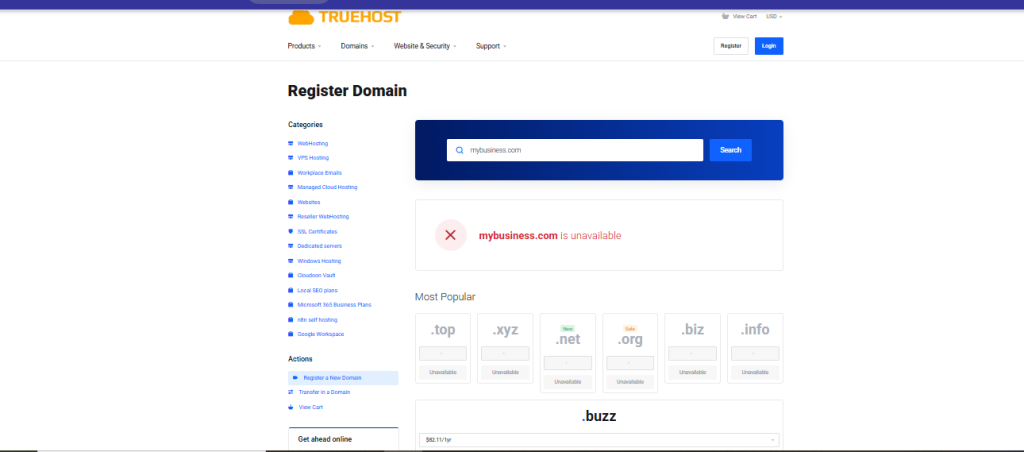
Right, now that you’ve got some ideas, it’s time to check if your dream domain is available.
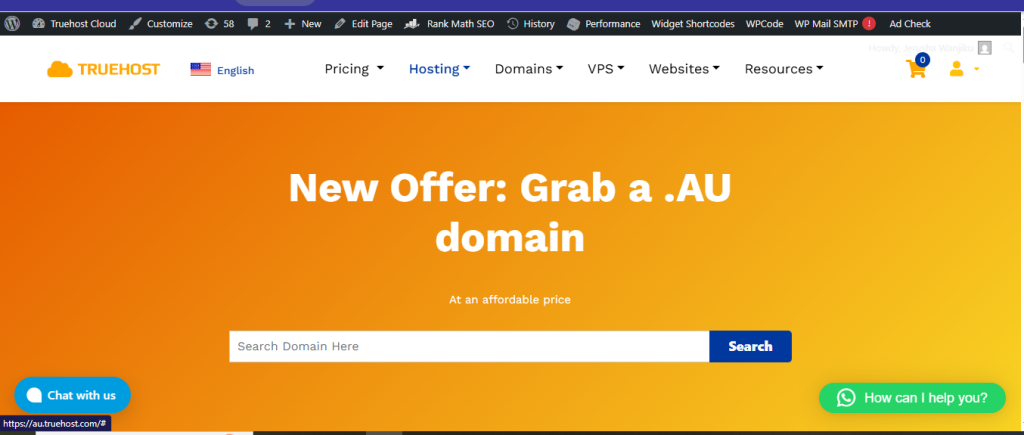
This is where you’ll use a domain name registration search tool. Truehost has a search box right on their homepage.
How to Search:
- Head to a domain registrar’s website
- Type your desired domain into the search bar
- Hit enter and wait a few seconds
- The tool will tell you if it’s available or taken
Pro tip: If your first choice is taken, the search tool usually suggests alternatives. Sometimes these suggestions are even better than your original idea!
What If Your Domain Is Taken?
Don’t panic. Here are your options:
- Try a different extension (.net.au instead of .com.au)
- Add a location word (sydneybakery.com.au)
- Use your full business name instead of abbreviations
- Get creative with synonyms
Step 4: Select a Reliable Domain Name Registration Provider
This is crucial, mates. Not all domain registrars are created equal.
A registrar is the company that actually processes your domain name registration and manages it for you. You want one that’s trustworthy, affordable, and offers good support.
What to Look for in a Domain Name Registration Service:
Transparent Pricing: Some registrars lure you in with cheap first-year prices, then hit you with massive renewal fees. Watch out for that.
Local Support: When something goes wrong at 2 AM, you want to talk to someone who understands Australian business hours and speaks your language.
Easy Management: You should be able to update your domain settings without needing a computer science degree.
Extra Features: Free SSL certificates, email forwarding, and domain privacy protection are nice bonuses.
Step 5: Complete Your Domain Name Registration Process
Alright, you’ve found your perfect domain and chosen your registrar. Now it’s time to actually register it.
Here’s the step-by-step process for domain name registration:
The Registration Process:
Add to Cart: Click the “register” or “add to cart” button next to your chosen domain.
Choose Your Registration Period: Domains are typically registered for 1-3 years. Longer periods often come with discounts.
Provide Your Details: You’ll need to enter:
- Your business name (exactly as it appears on your ABN)
- Your ABN or ACN number
- Contact information (email, phone, address)
- Billing information
Verify Your Eligibility: The registrar will check your ABN or ACN against government records to confirm you’re eligible.
Make Payment: Most registrars accept credit cards, PayPal, or bank transfers.
Confirmation: You’ll receive an email confirming your domain name registration. Keep this safe!
It can take up to two days for your domain name to be ready for use. But usually, it’s much faster—often just a few hours.
Step 6: Configure Your Domain Settings After Registration
Right, you’ve completed your domain name registration. But you’re not quite done yet.
You need to configure a few settings to make your domain actually work. Don’t worry—your registrar will guide you through this.
Essential Domain Settings:
DNS Records: These tell the internet where to find your website. If you’re hosting with Truehost, we’ll set this up automatically for you.
Email Setup: Create professional email addresses like [email protected]. This looks way more professional than a Gmail address.
Privacy Protection: This hides your personal contact details from public WHOIS databases. Highly recommended to avoid spam.
SSL Certificate: This secures your website with HTTPS encryption, which is often included free with hosting.
If you purchase your domain and hosting together from Truehost Australia, most of this configuration happens automatically. That’s one less headache for you.
Step 7: Connect Your Domain to Web Hosting
Here’s an important point: domain name registration by itself doesn’t give you a website.
Think of it this way: your domain is like a street address, but you still need to build the house. That “house” is your web hosting.
What Is Web Hosting?
Web hosting is where your actual website files live. It’s the server that stores your photos, text, and all the content that makes up your site.
Truehost Australia offers integrated domain and hosting packages, eliminating the need for separate configuration steps.
Connecting Domain to Hosting:
If you bought them separately, you’ll need to:
- Get your hosting nameservers from your hosting provider
- Log into your domain registrar account
- Update your domain’s nameserver settings
- Wait 24-48 hours for changes to take effect
But if you bought them together (which I recommend), this happens automatically. Easy peasy.
How Much Does Domain Name Registration Cost in Australia?
Let’s talk money, because I know you’re wondering.
The cost of domain name registration in Australia varies depending on the extension and registrar.
Common Domain Name Registration Mistakes to Avoid
I’ve seen people make these mistakes over and over during their domain name registration. Learn from their errors:
Don’t Do These Things:
Forgetting to renew: If you don’t renew your .au domain name before the end of the licence period, any services using your domain name will stop working and the domain name may become available to be registered by someone else. Set calendar reminders!
Not reading the requirements: Make sure you actually qualify for the domain type you’re registering.
Choosing a domain that’s too similar to competitors: This can create legal issues, especially if they have a trademark.
Using numbers or hyphens: These make your domain harder to communicate verbally.
Not protecting your brand: If you register mybusiness.com.au, consider also grabbing mybusiness.net.au and mybusiness.au to prevent copycats.
Protecting Your Domain After Registration
Once you’ve completed your domain name registration, you need to protect it.
Set up auto-renewal: This ensures your domain never expires accidentally.
Enable domain privacy: This keeps your personal information private.
Consider a trademark: Registering a domain name doesn’t give you any IP protection for that name—you should register your business name first and consider protecting it with a trade mark.
Register variations: Grab .com.au, .net.au, and the direct .au version if possible.
Ready to Start Your Domain Name Registration?
You’ve got all the knowledge you need now, mate.
Domain name registration in Australia doesn’t have to be complicated. Follow these steps, choose a reliable registrar like Truehost Australia, and you’ll have your domain up and running in no time.
Remember:
- Check your eligibility (ABN or ACN for .com.au)
- Choose a short, memorable domain name
- Use a trustworthy registrar with local support
- Configure your settings properly
- Protect your domain with auto-renewal
Your online journey starts with that domain name. It’s your digital handshake with customers, your brand identity, and your ticket to success online.
Ready to get started? Head over to Truehost Australia and search for your perfect domain today. With our competitive pricing, local support, and easy setup, we’ll have you online before you can say “G’day.”
Don’t wait—the perfect domain name won’t stay available forever. Grab yours now and start building your online presence the Aussie way.
