 Domain SearchSecure your perfect Australian domain in seconds
 Web HostingExplore budget-friendly web hosting packages
 cPanel HostingHosting powered by cPanel (The world’s most intuitive control panel)
 Reseller HostingStart your hosting reseller business, without the technical challenges
 Windows HostingOptimised for Windows applications and websites
 Affiliate ProgramGet paid for referring customers to our services
 WordPress HostingHigh-Speed, Optimised WordPress Hosting
 Email HostingSecure business email hosting using your own domain, professional, reliable, and easy to control.
 Domain TransferTransfer your domain with no downtime and complete control
 All DomainsFind and secure domain extensions from around the globe
 Whois LookupCheck domain ownership, expiry dates and registrar details
 .Com DomainSecure the world’s most trusted domain for instant credibility
 AU DomainsGet recognised .au domains made for Australian businesses and people
 SSL CertificateProtect your site with reliable SSL Certificates to safeguard data and build visitor confidence.
 Vps HostingScalable VPS. Complete access. Top-tier speed.
 Managed VPSNot a tech person? Go with our fully managed VPS service.
 Dedicated ServersGet all the power and all the control of your own physical server.
 AI Website BuilderMake professional websites in minutes with AI, no experience needed.
 Online Shop BuilderStart a professional online store. No coding needed.
 Web Design ServiceGet a website designed around your brand and built for your goals.
 BlogBrowse articles on web hosting, online business, digital marketing and other topics
 SupportGet help and instructions for all our services
 ContactConnect with us anytime using chat or email
Local search is one of the most powerful tools for Australian businesses.
When customers search for services nearby, the top results often appear on Google Maps.
Those results drive calls, visits, and real sales.
If your business appears in the top three results, you gain a strong advantage over competitors.
In this guide, we at Truehost will show you the exact steps to rank your local AU business on Google Maps.
We will use simple tactics that work in 2026.
The “Map Pack” Advantage
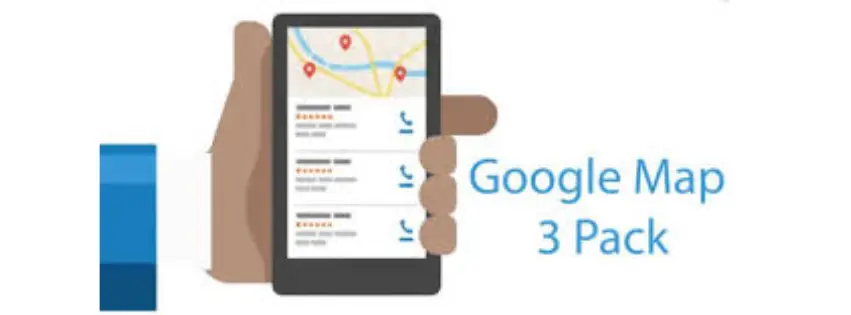
When people search for services, they often see a map with three businesses listed at the top.
This is called the Map Pack.
The Map Pack appears above normal search results.
That makes it the most visible spot in local search.
The map results come directly from Google Maps and the business listings inside Google Business Profile.
Why the Top 3 Spots are important
Businesses in the top three positions get most of the clicks.
They also receive more phone calls and direction requests.
Here are the typical benefits:
- Higher local visibility
- More phone calls
- More store visits
- Higher trust from customers
Many Australian businesses report that over 60% of local leads come from the Map Pack.
The 2026 Local SEO Landscape

Local SEO has changed a lot in recent years.
Google now focuses on Entity Trust and Hyper-local Relevance.
Entity trust means Google wants proof your business is real.
Hyper-local relevance means your business must show strong ties to a specific area.
This is why Australian businesses must show clear local signals.
These include business records, directories, reviews, and location content.
When done right, these signals help Google trust your business more.
That trust increases your chances of ranking on Google Maps.
Phase 1: Google Business Profile Foundation

Your Google Business Profile (GBP) is the heart of local SEO.
If it is poorly optimized, ranking becomes very difficult.
In Australia, accuracy and verification are critical.
Google rewards businesses that provide consistent and trustworthy information.
Below is the foundation checklist.
Claim and Verify Your Listing
First, claim your business profile.
Then verify it using postcard or video verification.
Verification proves that you control the business location.
Without it, your listing will not rank properly.
Steps:
- Sign in to Google Business Profile.
- Search for your business.
- Claim the listing.
- Complete the verification process.
Verification is one of the strongest local ranking signals.
Use Your Legal Business Name
Your business name must match your registered Australian name.
Avoid adding extra keywords to your name.
Example:
| Correct | Incorrect |
|---|---|
| Smith Plumbing Pty Ltd | Smith Plumbing Sydney Best Plumber |
Keyword stuffing may lead to penalties.
Always use your official business name.
Choose the Most Accurate Primary Category
Your primary category tells Google what your business does.
Choosing the correct category helps you rank for the right searches.
Examples:
| Generic Category | Better Category |
|---|---|
| Lawyer | Conveyancing Attorney |
| Restaurant | Italian Restaurant |
| Dentist | Cosmetic Dentist |
Specific categories increase ranking accuracy.
They also help customers find your service faster.
Add Your ABN for Extra Trust
A useful local SEO tip is adding your Australian Business Number (ABN).
You can include it in your business description.
Google uses business data to verify legitimacy.
Including your ABN strengthens entity trust signals.
Example description snippet:
“Truehost Australia provides web hosting services for small businesses.
ABN: 12 345 678 910.”
This simple step helps search engines trust your listing.
Define Your Service Areas
Many businesses serve multiple suburbs.
You should list these areas clearly.
Instead of writing only “Sydney,” include suburbs like:
- Parramatta
- Blacktown
- Chatswood
- Penrith
Listing suburbs improves hyper-local visibility.
It helps your business appear in nearby searches.
Phase 2: The NAP+W Consistency Audit

Google checks your business information across the internet.
This includes your Name, Address, Phone, and Website.
We call this NAP+W consistency.
If your information changes across websites, Google loses trust.
Consistent data helps confirm your business identity.
Match Your Website Footer
Your website must display the same information as your GBP listing.
Even small differences can create confusion.
Example:
| Google Listing | Website Footer |
|---|---|
| 15 King Street | 15 King St |
Google may treat these as different locations.
Always match them exactly.
Your footer should include:
- Business name
- Address
- Phone number
- Website URL
Build Citations on Australian Directories
Citations are listings of your business on directories.
They help Google confirm your business exists.
Important Australian directories include:
- Yellow Pages AU
- TrueLocal
- Localsearch.com.au
- White Pages
These sites have strong domain authority in Australia.
Listing your business there strengthens your local profile.
Sync With Apple and Bing Maps
Google does not work alone.
It compares data with other map providers.
Make sure your business also appears on:
- Apple Maps
- Bing Maps
These platforms act as trust validators.
Matching information across them improves your credibility.
Phase 3: On-Page Local Signals
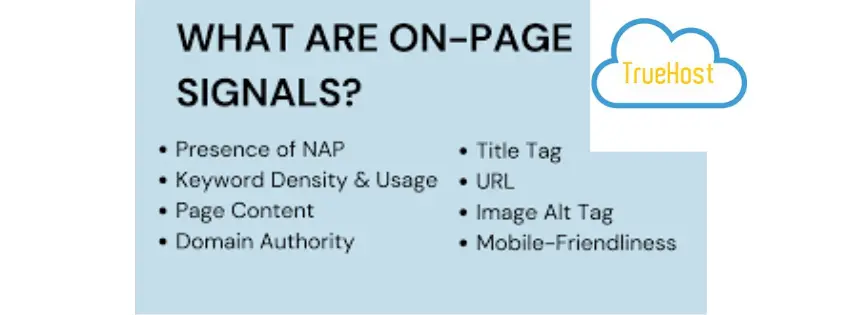
Your website must confirm your local presence.
Google looks at your content to verify location relevance.
This step connects your website with your Google Maps listing.
Create Location-Specific Pages
If you serve multiple suburbs, create pages for each location.
Each page should target a specific region.
Examples:
- /plumber-parramatta/
- /plumber-blacktown/
- /plumber-penrith/
These pages help you rank for suburb searches.
They also increase your local authority.
Use LocalBusiness Schema Markup
Schema markup is code that helps search engines understand your business.
It clearly defines your business type and location.
Example information included in schema:
- Business name
- Address
- Phone number
- Opening hours
- Country code
For Australian businesses, the ISO country code should be AU.
This structured data improves local search accuracy.
Embed Your Google Map
Adding a map to your contact page helps confirm your location.
It creates what we call a proximity loop.
Steps:
- Open your Google Business Profile.
- Find your map listing.
- Copy the embed code.
- Place it on your contact page.
This tells Google your website and map listing belong together.
Use Australian English
Language matters in local SEO.
Using local terminology improves relevance.
Examples:
| Australian Term | Other Term |
|---|---|
| Ute | Truck |
| Chemist | Pharmacy |
| Footy | Football |
| Surgeries | Offices |
Local language matches how Australians search online.
This increases your chance of ranking for local queries.
Phase 4: Reviews and Reputation Management

Customer reviews are a powerful ranking signal.
Google measures both quality and frequency.
In Australia, review velocity plays a big role.
This means how quickly you receive new reviews.
The Review Velocity Effect
Businesses that receive steady reviews rank higher.
A slow review rate can reduce visibility.
Below is a simple illustration.
Reviews Per Month vs Ranking StrengthHigh Reviews   |████████████████
Medium Reviews |██████████
Low Reviews    |████
Consistent reviews build trust with both Google and customers.
Target Local Guides
Some reviewers are part of Google’s Local Guide program.
Their reviews carry more influence.
Encourage these customers to leave feedback.
Their reviews often include photos and detailed comments.
This improves your listing quality.
Respond to Every Review
Responding to reviews shows active engagement.
It also helps add relevant keywords.
Example response:
“Thanks for choosing us for your roof repair in Geelong.
We appreciate your support.”
These responses reinforce your local relevance.
Upload Geo-Tagged Photos
Photos help Google confirm your location.
They also attract customers.
Good photo ideas include:
- Team working on local streets
- Projects near landmarks
- Storefront images
- Customer service moments
Posting photos regularly keeps your listing active.
Phase 5: Hyper-Local Link Building

Traditional SEO values big authority links.
Local SEO values nearby links.
Links from local organizations help prove your community presence.
Sponsor Local Events
Local sponsorships can earn powerful backlinks.
Community organizations often link to sponsors.
Examples include:
- Local footy clubs
- Community charities
- School events
These links usually come from .org.au or .com.au domains.
They send strong local trust signals.
Reach Out to Local News
Local newspapers often feature community businesses.
Getting mentioned there can boost visibility.
You can pitch stories to outlets like:
- The Age
- The Daily Telegraph
Topics could include:
- Business milestones
- Community initiatives
- Local success stories
These mentions can generate strong local links.
Partner With Nearby Businesses
Local partnerships help both companies grow.
They also create natural backlinks.
Examples:
| Business Type | Partner Example |
|---|---|
| Real Estate Agent | Local Cleaner |
| Wedding Planner | Florist |
| Gym | Nutritionist |
Each business can recommend the other.
This builds trust with both users and search engines.
Summary Tactical Checklist
Below is a quick overview of the key actions.
| Action Item | Frequency | Impact Level |
|---|---|---|
| GBP Post Updates | Weekly | Medium |
| Review Requests | Daily | High |
| Citation Audit | Quarterly | Medium |
| Local Content Creation | Monthly | High |
Following this routine keeps your local SEO strong.
Consistency is the key to long-term ranking.
Final Thoughts
Ranking your local AU business on Google Maps requires patience and precision.
But the rewards are significant.
By optimizing your Google Business Profile, maintaining NAP consistency, and building local trust signals, your business can dominate local search results.
We recommend starting with the Google Business Profile foundation.
Then strengthen your website and build reviews steadily.
At Truehost, we believe local SEO is one of the best growth channels for Australian businesses.
When done correctly, it brings highly targeted customers who are ready to buy.
If you follow this tactical checklist, your business will have a strong chance of reaching the Google Maps top three.
