 Domain SearchSecure your perfect Australian domain in seconds
 Web HostingExplore budget-friendly web hosting packages
 cPanel HostingHosting powered by cPanel (The world’s most intuitive control panel)
 Reseller HostingStart your hosting reseller business, without the technical challenges
 Windows HostingOptimised for Windows applications and websites
 Affiliate ProgramGet paid for referring customers to our services
 WordPress HostingHigh-Speed, Optimised WordPress Hosting
 Email HostingSecure business email hosting using your own domain, professional, reliable, and easy to control.
 Domain TransferTransfer your domain with no downtime and complete control
 All DomainsFind and secure domain extensions from around the globe
 Whois LookupCheck domain ownership, expiry dates and registrar details
 .Com DomainSecure the world’s most trusted domain for instant credibility
 AU DomainsGet recognised .au domains made for Australian businesses and people
 SSL CertificateProtect your site with reliable SSL Certificates to safeguard data and build visitor confidence.
 Vps HostingScalable VPS. Complete access. Top-tier speed.
 Managed VPSNot a tech person? Go with our fully managed VPS service.
 Dedicated ServersGet all the power and all the control of your own physical server.
 AI Website BuilderMake professional websites in minutes with AI, no experience needed.
 Online Shop BuilderStart a professional online store. No coding needed.
 Web Design ServiceGet a website designed around your brand and built for your goals.
 BlogBrowse articles on web hosting, online business, digital marketing and other topics
 SupportGet help and instructions for all our services
 ContactConnect with us anytime using chat or email
Buying a domain name is exciting. It’s the start of your online journey. But what happens next? Many new website owners stop at registration and miss key steps that make a big difference.
If you’ve just bought a domain name, you’re already halfway there. The next moves decide whether your website becomes a real brand or just another parked name on the internet.
Here are your first 5 must-do steps after buying your domain name. And whatever you do
1) Connect Your Domain Name to Hosting
Your domain name is like your home address. Hosting is your house. You need both to make your website visible online.
Without hosting, your visitors will see a blank page. Choose a reliable hosting provider that matches your needs and budget. In Australia, speed and uptime matter. Look for one with local data centres or a strong global network.
For example, Truehost offers fast cloud hosting that works perfectly for small businesses, bloggers, and online stores. Their setup makes connecting your domain simple.
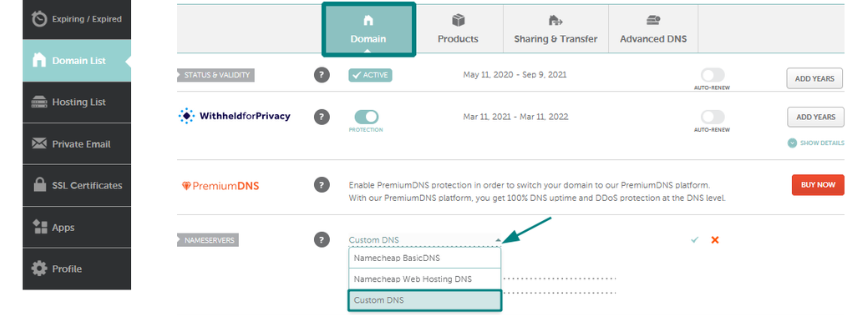
Here’s how to connect your domain name to hosting:
- Log in to your hosting account.
- Find your hosting’s DNS or nameserver details.
- Go to your domain registrar’s dashboard.
- Update your nameservers with the new ones.
- Wait a few hours for the DNS to propagate.
Once it’s live, you can start uploading your website files or install WordPress.
Pro Tip: Check your hosting speed using GTmetrix to make sure your site loads quickly for Australian visitors.
2) Set Up Domain Email
A professional email makes a huge difference. Instead of using Gmail or Yahoo, create one that matches your domain name.
For example, use [email protected] instead of [email protected]. It builds trust and looks more credible in customer inboxes.
Setting this up is easy if your host offers email services. Just go to your hosting dashboard and create a new mailbox.
If you prefer Google Workspace or Microsoft 365, you can connect them to your domain name using MX records. Both options let you send and receive emails through Gmail or Outlook but still use your custom domain.
Bonus Tip: Add a contact form on your site so customers can reach you directly.
3) Secure Your Domain Name (The Step Most People Miss!)
This is the step many skip and regret later. Your domain name is your brand’s identity online. If it expires or gets hijacked, you can lose your whole business overnight.
Here’s how to secure it:
- Turn on auto-renewal. Never risk forgetting to renew manually.
- Register for multiple years. This not only saves you time but also boosts SEO trust with Google.
- Add WHOIS privacy protection. This hides your personal details from public view.
- Lock your domain. Prevent unauthorised transfers or changes.
- Use strong passwords and enable 2FA on your registrar account.
You can learn more about protecting your domain from hijacking in this guide by Truehost.
If you plan to grow your business, it’s also smart to register similar domains. For example, if you own mybakery.com.au, grab mybakery.com or mybakery.net.au to stop competitors from copying your brand.
4) Build and Launch Your Website

Now it’s time to turn your domain into something real. You can either build your own site or hire someone to do it.
If you’re new to this, platforms like WordPress, Wix, or Shopify make it easy. They offer templates that you can edit without coding. For businesses in Australia, WordPress is a great choice because it’s flexible and works well with local SEO tools.
To launch your website:
- Log in to your hosting account.
- Install WordPress or your preferred builder.
- Pick a clean, mobile-friendly theme.
- Add your logo, pages, and contact info.
- Publish your first post or product page.
Keep it simple at first. Add only the pages that matter Home, About, Services, and Contact.
Quick Tip: Use Canva to design your logo or social media graphics. It’s free and perfect for beginners.
Once live, check how your site looks on phones and tablets. Australians browse heavily on mobile, so a responsive layout is non-negotiable.
5) Add Domain Name Extras That Boost Growth
Your domain name is more than a web address. It’s a marketing tool. The right extras can help your site grow faster and rank better.
Here’s what to do next:
A) Add an SSL Certificate
Visitors need to feel safe. SSL encrypts your data and shows a padlock icon in browsers. Most hosts, including Truehost, offer free SSL with all plans.
B) Set Up Google Tools
Add Google Analytics to track visitors and Google Search Console to monitor your SEO performance.
C) Connect Social Media
Link your Facebook, Instagram, or TikTok accounts. It helps build your brand and drive traffic to your site.
D) Create a Backup Plan
Set automatic backups. If your site crashes or gets hacked, you can restore it in minutes.
E) Create a Domain-Based Brand
Use your domain name everywhere email signature, flyers, and social media bios. It keeps your brand consistent and memorable.
Additional Tip: Optimise for Local SEO
If your business targets Australians, local SEO is vital. Search engines love location-based signals.
Start by registering your business on Google Business Profile. Use your domain email for verification it looks more official.
Then:
- Add your business address and contact info.
- Collect customer reviews.
- Use your city or region name in your content (e.g., “best baker in Sydney”).
- Make sure your website loads fast in Australia.
With these, your domain name gains visibility and attracts local customers faster.
Example: How It Looks in Action
Here’s how a small business can apply these steps.
| Step | Action | Result |
|---|---|---|
| 1 | Connect domain to hosting | Website goes live |
| 2 | Create domain email | Builds trust with clients |
| 3 | Secure the domain | Prevents hijacking and loss |
| 4 | Build website | Creates online presence |
| 5 | Add extras | Boosts growth and SEO |
Imagine you’ve just bought coastalcakes.com.au. You connect it to hosting, set up [email protected], secure it for 5 years, and install WordPress. Within days, your bakery has a live site where customers can place orders online.
That’s how fast your domain name can become a working business asset.
Common Mistakes to Avoid
Avoid these, and your domain name will stay safe and effective for years.
When to Ask for Help
If things feel tricky, don’t stress. Domain and hosting support teams are there for you.
Truehost Australia offers 24/7 support with live chat and tutorials for new domain owners. You can get help connecting your domain, setting up email, or installing SSL fast and free.
They even offer domain transfers if you want to move your name from another registrar without downtime.
In Review
Buying a domain name is your first step toward building something great. But it’s what you do after that makes the difference.
Connect it to hosting. Create a domain email. Lock it down for safety. Build a website that works. Then add tools that help it grow.
Every brand starts small but the ones that act fast win big.
Don’t let your domain just sit idle. Turn it into your digital home today with Truehost Australia fast, reliable, and ready to help you grow online.
